Our work on NearOps connected customer booking with engineer coverage, travel-aware scheduling, job progress, Stripe payments and accounting. It includes QR payment links, Google Calendar updates and mobile job records for the team doing the work.
Client project / Contributed scope
Project: NearOps Case study by Obdurate Systems
Project brief
- Delivery period
- April–June 2026
- Built for
- Customers, office staff and mobile field engineers.
- Our role
- Custom application development and systems integration.
- The brief
- Connect customer bookings to engineer coverage, scheduling, job records, payments and accounting.
From back-and-forth calls to automated booking.
- Before
- Customers had to wait while the team checked the calendar, found an engineer covering their location and confirmed availability. Arranging an appointment meant back-and-forth calls to coordinate the customer and engineer.
- After
- The booking flow now checks the customer's location, engineer coverage and availability automatically, then presents suitable appointments. Customers can choose a time without waiting for the team to coordinate those checks by phone.
The result is less time spent arranging bookings, fewer coordination calls and less waiting for customers. The team can focus on delivering the work while the system handles routine booking checks.
One appointment change, from rescheduling to payment.
A customer needs to move an appointment. This illustrative walkthrough follows the implemented workflow as the change reaches the engineer, payment and accounting.
Choose another eligible appointment
The customer opens their booking's rescheduling link and selects a new time. The application checks the change rules and availability, including travel fit for travel-aware schedules, before accepting the move.
Carry the change into the calendar
The booking keeps its reference. The Google Calendar connection updates the associated event, and notifications communicate the change to the customer and engineer. A calendar update that cannot finish immediately can wait for a retry.
Work from the same job record
On the appointment day, the engineer can send an arrival estimate and record notes or photos against the booking. The office and the engineer can refer to the same job information as the work progresses.
Let the customer pay on their own phone
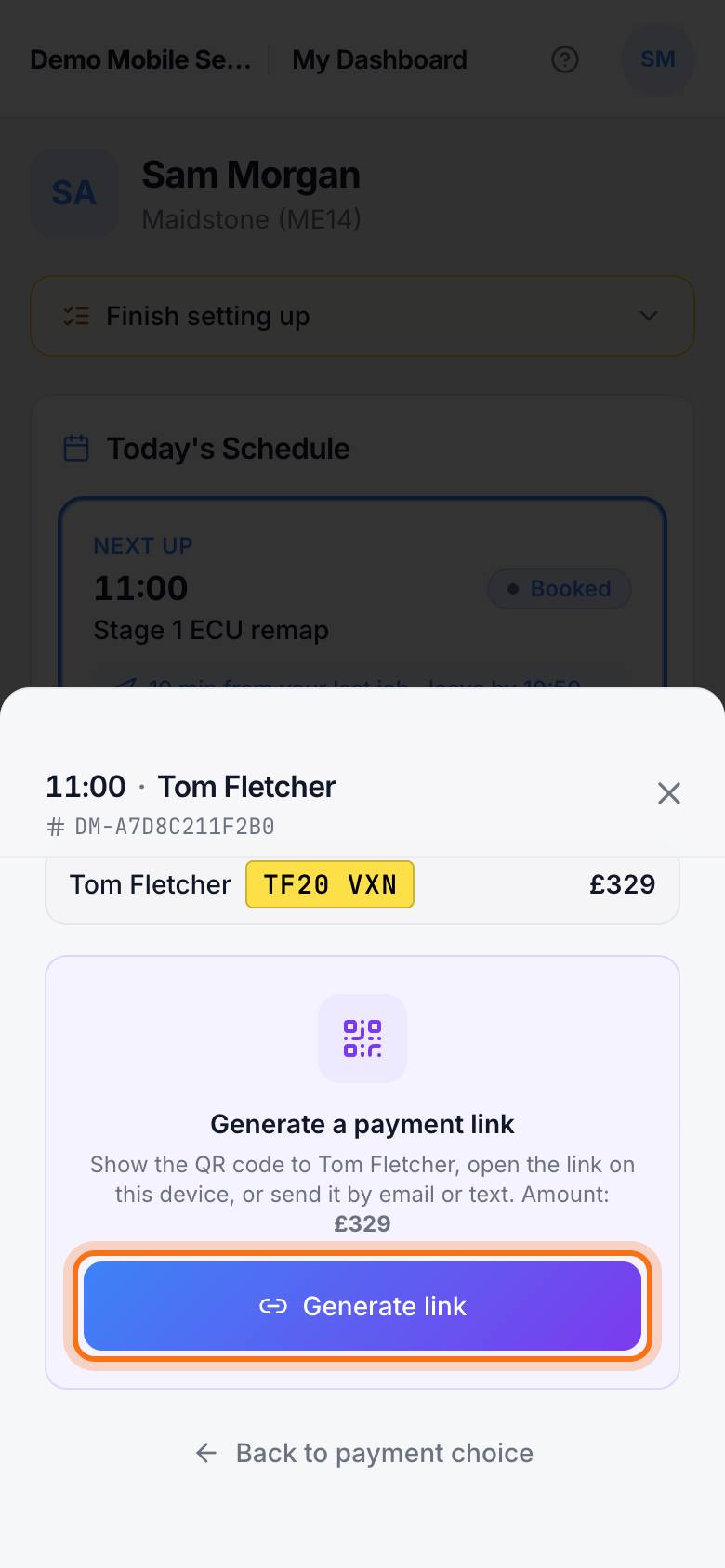
When payment is due, the engineer can generate a link for that booking and display its QR code. The customer completes Stripe checkout on their own phone. Provider confirmation determines whether the payment is recorded as successful.
Send the separate accounting records
The customer-payment webhook carries payment and customer-invoice information into the accounting workflow. Later, when the office records an engineer payment, a separate webhook sends that payment statement with its own references.
Match each booking to an engineer's service area.
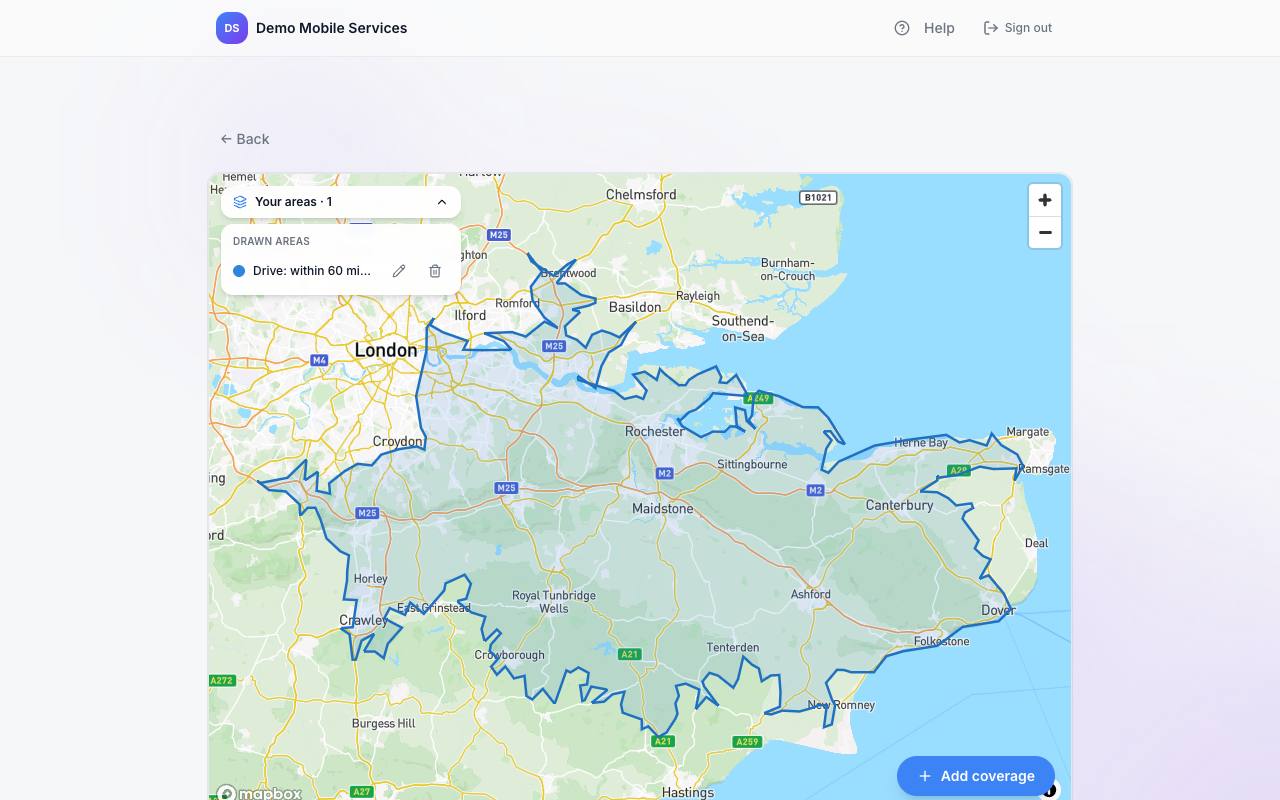
Coverage is part of the booking logic. Engineers can define areas around base locations and draw territories on a map. Primary and backup coverage rules give the operation more control than a single distance limit for the whole team. Backup engineers can be offered when primary coverage has no near-term availability.
The drive-time coverage algorithm traces areas along the road network. For larger travel-time bands, it combines additional areas calculated from points around existing boundaries. Those extended outlines are marked as estimates and can be adjusted on the map. This lets engineers define coverage by estimated driving time as well as distance or a manually drawn territory.
The application checks the customer's location against those areas before offering suitable engineers and times. The office coverage map brings the team's areas together, making it possible to inspect overlaps and gaps while managing where bookings can be accepted.
Geography and availability answer different questions. Being inside an engineer's territory establishes coverage; the scheduling rules still need to check whether that engineer can fit the appointment into the working day. Keeping both checks in the workflow connects the map to an appointment the customer can actually book.
Suggest appointments that fit the engineer's day.
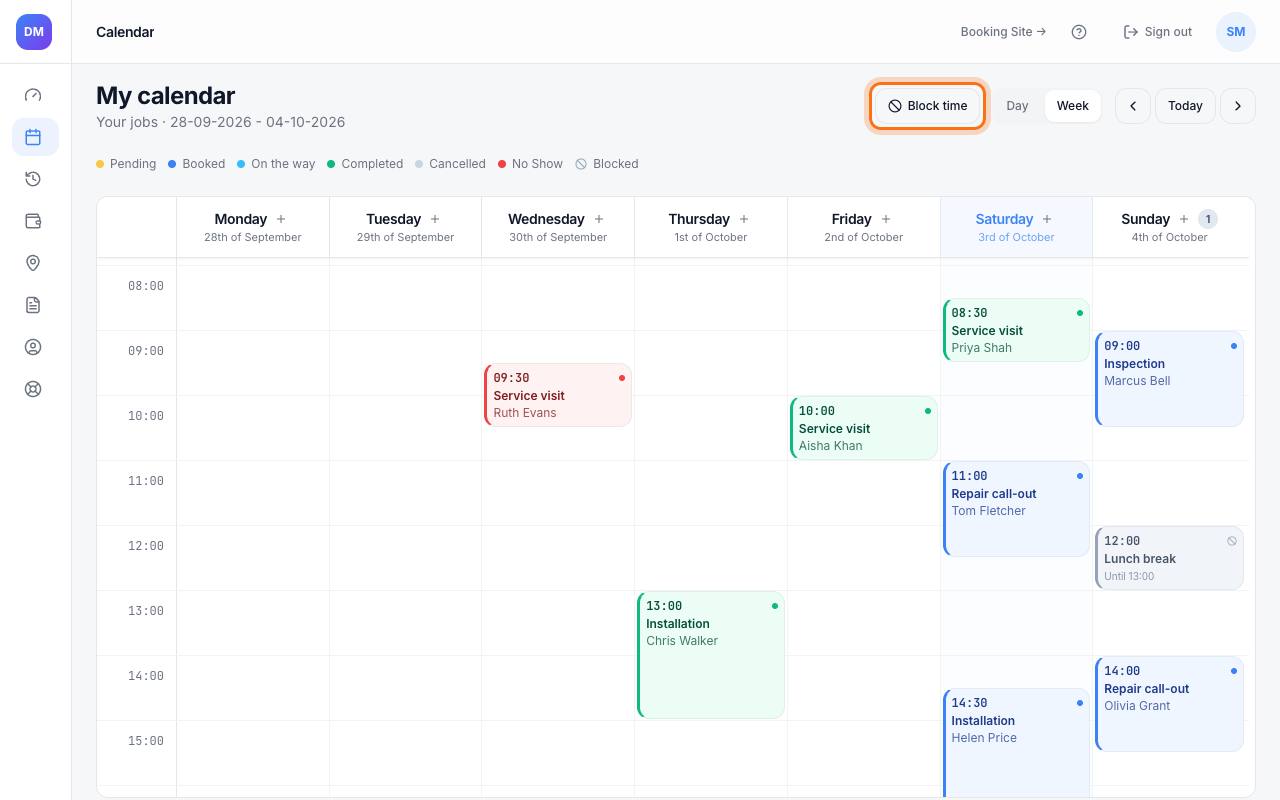
The public booking flow combines the selected service, location and engineer with available appointment times. For travel-aware schedules, slot suggestions consider existing jobs and the travel needed to reach the new appointment. Times that fit around nearby work can be marked as recommended while other reachable times remain available.
For example, a gap between two appointments needs enough room for the service and the journeys around it. The implementation uses mapping and travel calculations to assess that fit, with estimated travel as a fallback when a routing response is unavailable. The booking flow can then distinguish a reachable appointment from one that only appears free on the calendar.
Google Calendar integration creates or updates events as bookings change. Cancellations and reassignment remove obsolete events. Connected input calendars can also contribute busy periods to availability, so scheduling takes account of commitments recorded outside the booking application.
Follow the job from the engineer's phone.
The engineer workspace brings assigned jobs, customer information and job actions together. Job progress tracking includes an "on my way" action that can use the engineer's current location to calculate an arrival estimate and notify the customer. The action requests a one-time location lookup from the engineer's phone.
Job records hold notes, photos and relevant service information. For vehicle work, the job card also supports mileage, warning lights and fault codes. These details stay with the booking so the office and engineer can refer to the same record.
Mobile work also means unreliable signal. The engineer view can show its saved job list, and notes, mileage and photos can be queued on the device for submission when the app reconnects. The interface distinguishes waiting changes from completed submissions and reports changes that cannot be accepted.
Let the customer pay through a link or QR code.
Stripe payment integration supports a payment link attached to the booking. An engineer can display that link as a QR code for the customer to scan and complete checkout on their own phone. The same payment journey can be shared as a link, giving the team a way to collect payment without asking the customer to use the engineer's device.
The application also supports saved-card payment handling. Saving a card and taking a payment are separate actions: card setup alone does not mean the booking has been paid. Completed, failed and processing attempts need different handling in the operational record. If a saved-card payment is declined or needs customer authentication, the team can send a payment link so the customer can complete checkout on their own phone.
The payment implementation checks Stripe confirmation against the expected booking payment, including the amount and currency. Repeated payment requests and notifications are handled with identifiers that help avoid processing the same attempt twice. The QR code is the entry point; confirming what happened to the money is the rest of the workflow.
Carry both sides of the invoice workflow into accounting.
A customer payment is only one side of the financial record. The operation also needs to account for payments to engineers. We added webhooks for Zapier so the relevant invoice information can pass from the application into the client's accounting workflow.
The handoff keeps customer invoices and engineer payment records distinct. They relate to the same operation, but represent different transactions and need their own references and invoice details.
- Customer invoices
- Invoice information for the final customer follows the customer payment workflow into accounting.
- Engineer payment statements
- When an engineer payment is recorded, its payment statement and references are sent through a separate accounting webhook.
Keep the handoffs recoverable when plans change.
The difficult part of this system is what happens between the screens. A changed booking needs a calendar update. A customer can complete checkout after the engineer has closed the payment dialog. A job note may be written while the phone has no connection.
These situations need explicit states and recovery paths. Calendar changes can wait for a retry, payment notifications reconcile with the booking's payment attempt, and offline edits show pending or failed states. The application keeps track of work that still needs attention when an external call or submission cannot finish immediately.