From emailed purchase orders to reviewed drafts
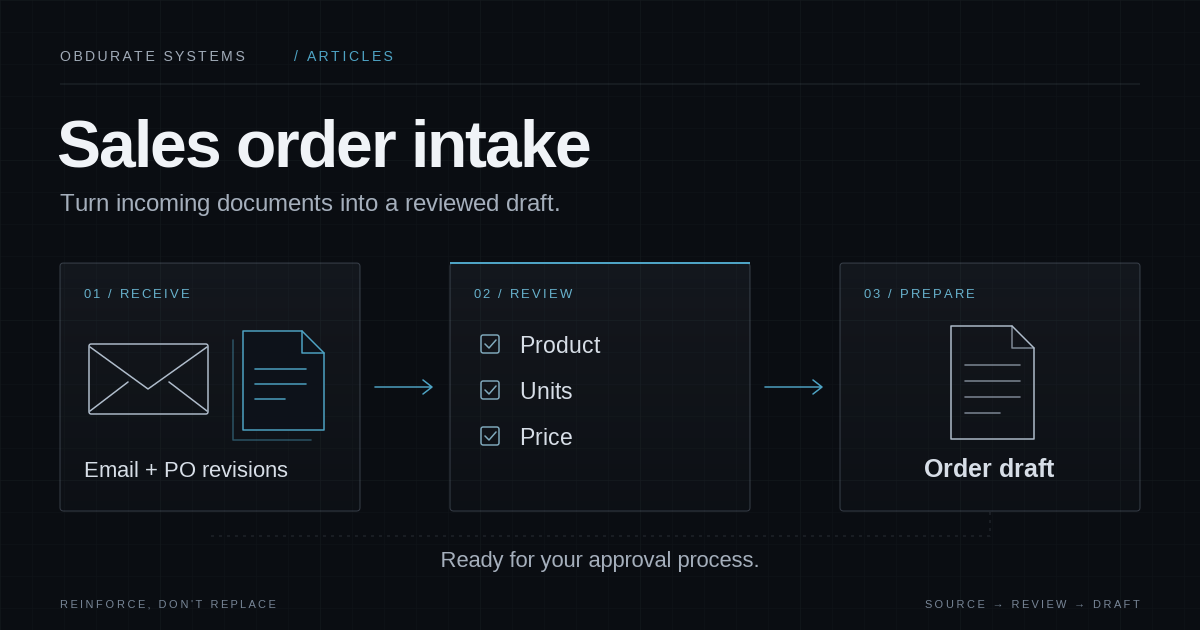
For operations teams handling customer orders by email, the work often includes retyping order lines and chasing missing details. The aim of automating that intake is to reduce repeated entry and give reviewers a traceable draft, with unresolved quantities or prices clearly marked.
Sales order processing automation connects order intake, data capture, review and the handoff to an ERP or another business system. For orders arriving by email, a useful first result is a sales-order draft with a source for each value and a clear record of anything that still needs a decision.
A customer's purchase order describes what they want to buy. Your sales order records the transaction on the seller's side. This guide follows the work between the two: turning an emailed purchase order into a reviewed draft, ready for your agreed approval or system handoff.
In the workflow proposed here, software would capture the email and attachments, extract candidate fields with their source references, and check required values against approved customer and product records. It would prepare the draft and route missing or conflicting details to the right reviewer. Those routine steps depend on having the relevant records and checking rules in place.
People still resolve uncertain revision instructions, confirm unknown pack sizes and settle price disagreements. The useful division is to automate the repeated preparation and checks, then give each reviewer the evidence needed for a decision.
The following documents and numbers are fictional. They illustrate an intake workflow rather than a completed client project. All amounts are goods subtotals, excluding tax and delivery.
On 22 October 2026, a customer sends this message:
Please use PO EX-1048 Rev 2. Rev 1 is attached for reference. We need three boxes of PF-17 filters and the same four BR-04 brackets. The agreed filter price is €12 per filter. Please deliver on 20 November 2026.
The attachments contain these lines:
Scroll sideways to see all columns.
| Document | Order lines | Goods subtotal |
|---|---|---|
| EX-1048 Rev 1 | Filters: 2 boxes at €125 per box. Brackets: 4 items at €25 each. | €350 |
| EX-1048 Rev 2 | Filters: 3 boxes at €125 per box. Brackets: 4 items at €25 each. | €475 |
Neither attachment states how many filters a box contains. The email gives a different price basis from the documents. Those details need to be resolved before the order can be converted into individual units and priced consistently.
Keep the message and both attachments together. Record the customer account, purchase-order reference and the instruction identifying Rev 2 as current. Confirm that the sender is authorised to give that instruction under your process. Preserve Rev 1 as a superseded document so a reviewer can follow the change.
A filename or upload time is not enough to decide which version governs an order. Here, the message supplies an explicit revision instruction. Where that instruction is missing or contradictory, the order needs clarification.
An intake tool can propose the customer reference, product codes, quantities, units, prices and requested delivery date. Each proposed value should remain linked to the message or document location it came from.
This gives the reviewer something concrete to check. A row showing “3 BOX - Rev 2, line 1” preserves information that disappears if the system immediately converts the quantity to an assumed number of items.
There are several different questions in this example:
Scroll sideways to see all columns.
| Field | Source evidence | What needs checking |
|---|---|---|
| Filter product | Rev 2, line 1: PF-17 | Which internal product matches this customer code? |
| Filter quantity | Rev 2, line 1: 3 BOX | How many filters are in the applicable box? |
| Filter price | PDF: €125 per box. Email: €12 per filter. | Do the prices agree after the pack size is confirmed? |
| Bracket product | Document: BR-04. Extracted proposal: BR-O4. | Did extraction confuse the digit zero with the letter O? |
| Delivery | Email: 20 November 2026 | Record this as the requested date; fulfilment must confirm any commitment. |
The bracket code is an extraction issue: the reviewer can compare the proposal with the original document. The pack size is a missing business fact: it must come from a verified product record or an authorised clarification. A tool's confidence in reading the text cannot settle either a missing pack size or a disagreement over price.
Assign each unresolved field to someone who can make the relevant decision. The roles below are examples; use the responsibilities your team actually has.
The order coordinator checks the bracket document, corrects BR-O4 to BR-04 and records the correction. Keep the original extraction available alongside the reviewed value so the change can be explained.
The product-data owner confirms that customer code PF-17 maps to internal product FILTER-17, with ten filters in each box for this order. Three boxes therefore represent 30 filters. Keep both quantities: the customer's three boxes and the 30 individual units needed by the destination system.
With the pack size confirmed, the price conflict becomes explicit. The attachment's €125 per box equals €12.50 per filter. The email asks for €12 per filter. Both sources may have been read correctly; a commercial decision is still needed.
The commercial owner checks the applicable agreement and contacts the buyer to resolve the mismatch. In this example, the buyer sends Rev 3 on 23 October, explicitly replacing Rev 2. It states three boxes at €120 per box and retains four BR-04 brackets at €25 each. The commercial owner verifies and accepts the corrected price under the seller's approval rules.
Record the resolution against the order: which source changed, what was confirmed and who reviewed it. If the buyer has not replied, the order should remain visibly awaiting clarification. A blank field or an unexplained “failed” status leaves the next person to reconstruct the problem.
Assume the receiving system stores these products as individual units. The reviewed draft now contains:
Scroll sideways to see all columns.
| Item and quantity | Verified unit price | Line subtotal |
|---|---|---|
| FILTER-17: 30 filters, from 3 boxes of 10 | €12 | €360 |
| BR-04: 4 brackets, ordered individually | €25 | €100 |
| Goods subtotal | Tax and delivery excluded | €460 |
The draft also retains the customer account, reference EX-1048 Rev 3, requested delivery date, source documents and review decisions. Rev 1 and Rev 2 remain linked as superseded versions. Quantities and commercial prices point to Rev 3; the pack size points to the verified product record. The requested delivery date remains linked to the original email.
Its status is reviewed draft ready for the agreed next approval or handoff. Stock availability, delivery commitments and any further order acceptance checks still follow your normal process. Completing intake does not itself mean that an order has been accepted or saved in the ERP.
For that next stage, our ERP integration guide covers connector selection, amendments, duplicate prevention and recovery when a write times out. Establishing the order's meaning first gives that integration a clear record to work with.
Choose one mailbox and a bounded set of order types for the first trial. Include ordinary orders as well as revised attachments, unfamiliar product codes, missing units and conflicting prices. Check the expected outcome with the people who handle those cases today.
Give a parser, document extraction product or proposed custom workflow the same examples. Review what it produces and what your team must do next:
- Can a reviewer find the source for every important field?
- Are unresolved quantities and prices held for a decision, without guessed values?
- Can the team see which revision is current and what changed?
- Does each blocked order have an owner, a reason and a next action?
- After review, does the draft preserve both the customer's wording and the values required by the destination system?
Record review time, corrections, recurring blockers and incorrect drafts that slipped through the checks. Agree acceptance criteria for the particular workflow before the trial. An apparent reduction in typing is less useful if reviewers spend that time searching through attachments or correcting silent assumptions.
Use what you learn to choose the implementation. Existing ERP features or an order-processing product may cover the work. A configured workflow or a small custom component may help with a specific gap. Our Build vs Buy guide explains how to compare those options against the work your team actually does.
Start with an order that currently requires several emails or manual checks. Identify what arrived, what someone had to clarify and what the final record needed to contain. That gives you a concrete scope for sales order automation.
Obdurate Systems works on email workflow automation and ERP integration around existing business processes.