A decision guide for approval workflows and dashboards
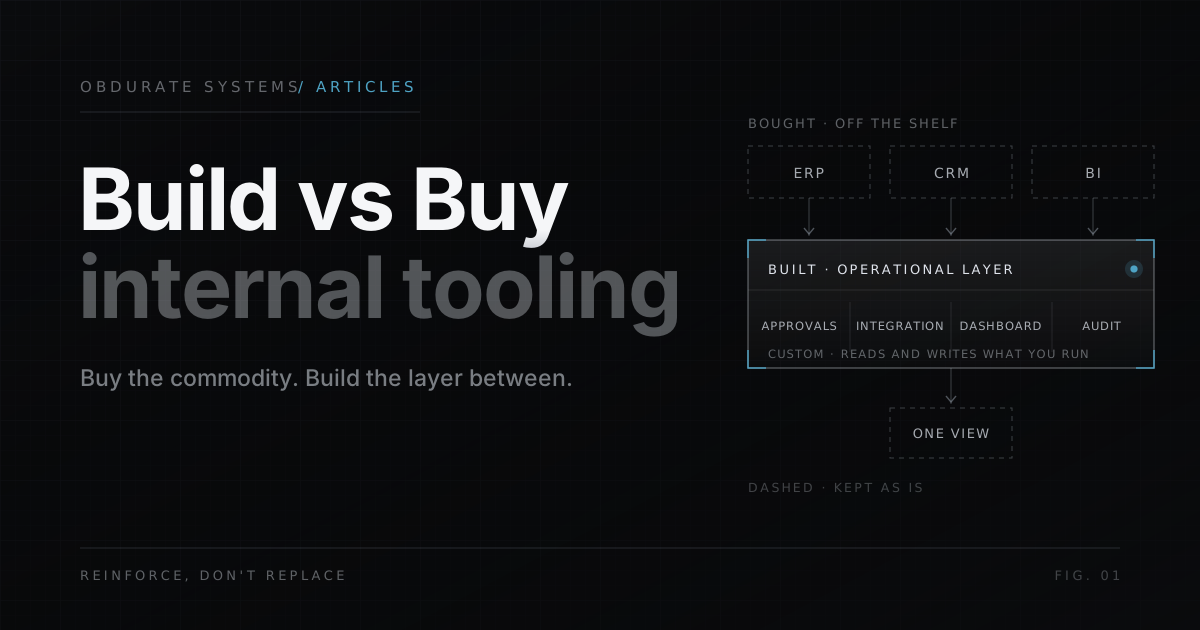
The question lands on the desk of every operations leader and CTO eventually: this workflow is slow, brittle, and crawling with manual handoffs. Do we buy a tool, or do we build our own?
The honest answer is that both options are expensive, and both will get the job done. The difference is not price tag. It is whether the solution reinforces the way your business already works, or forces you to rebuild around the tool. Frame the decision around that principle and the right call stops being a gamble.
Forget the feature lists for a moment. A build-versus-buy decision is really a decision about two different kinds of fit.
An off-the-shelf product fits the average business. It is polished, well-documented, and proven at scale, because thousands of companies use it. It also comes pre-committed to assumptions: a fixed data model, a fixed approval flow, a fixed idea of what your process looks like. If your operations are close to that default, buying is fast and cheap.
Custom internal tooling fits your business specifically. It is built around your ERP, your CRM, your approval hierarchy, and the peculiarities of how your teams actually work. The cost is that somebody has to build it, maintain it, and carry its risk. When it is done well, it disappears into the workflow instead of demanding the workflow reconfigure around it.
Neither approach wins by default. The win depends on the layer you are trying to fix.
Purchasing is the right answer more often than teams admit. For commodity capabilities where your process genuinely matches the product, buying is lower-risk automation you do not have to own.
Strong candidates for off-the-shelf: generic project management, standard ticketing, common collaboration tools, and any workflow where the biggest cost is retraining on a new interface, not diverging from the tool’s defaults. The team starts tomorrow, the vendor handles upgrades and uptime, and the total cost of ownership is predictable.
The trap is buying a product that is adjacent to your process rather than aligned with it. When you force a generic platform to absorb a bespoke approval chain or a proprietary data flow, you buy a licence, then spend years bending your operations to fit. That is where the savings evaporate.
Most objections to custom software are really objections to poorly scoped custom software. But the objections are real, and you should take them seriously before committing.
Two costs dominate. The first is the build itself: engineering time, design, testing, and the long tail of edge cases that only surface after launch. The second is ongoing maintenance, which never goes away. Every internal platform is an asset that must be patched, extended, and documented long after the launch milestone.
There is also direct and indirect opportunity cost. The same senior engineers building your internal platform are not shipping your actual product or running your revenue-critical systems. For a hard deadline or a small feature, that trade is rarely worth it.
Write these costs down before you evaluate the build. A realistic estimate with maintenance included beats an optimistic launch estimate every time.
There are three situations where buying loses to building, and they all share one trait: the value sits in how your systems connect, not in the tool itself.
The first is the approval layer. Compliance chains, multi-signer sign-off, department routing, audit trails, negotiated exceptions. No off-the-shelf approval product matches the exact hierarchy of a complex organisation, so the decision is not which product — it is whether a brittle fixture beats a clean build. It does not.
The second is the operational dashboard. Executives and managers want one view of data pulled from the ERP, the CRM, the warehouse, and the finance ledger. Off-the-shelf BI tools display data; they do not reconcile five systems into one coherent picture. That reconciliation is custom integration work.
The third is the integration itself. Our ERP and API integration services cover how to assess those handoffs. Standard ERP and CRM connectors will join two systems at the field level, but connecting an enterprise topography — ERP to CRM to API-backed services — with error handling, logging, and real-time sync is a custom engineering problem. Buying a point-to-point patch here is how integration debt accumulates.
When you reach the fork, run the workflow through four filters before spending anything.
- 01Does it match the product’s default?If your process is close to the off-the-shelf norm, buy it. Stop there.
- 02Is the value in the connection, not the screen?Approvals, integrations and cross-system dashboards are build territory.
- 03Can you scope the build honestly?Only proceed if you have named the full build cost plus the maintenance burden. If you cannot scope it, you are not ready to build it.
- 04Who owns it long-term?A custom platform needs an owner who will maintain and extend it. No owner, no build.
If any filter points to a build, the decision is about who builds it, not whether to build at all. That is the fork between growing an internal team and engaging a partner who has done these integrations before and can carry the maintenance risk with you.
The build-versus-buy decision is rarely a single choice. In practice, most established operations land on a hybrid: buy the commodities, build the connections, and let each layer do what it does best.
Buy where your process matches the product’s defaults. Build where the value lives in connecting the systems you already run — the approval layer, the dashboard, the integration mesh. Skip the gamble of replacing the ERP or CRM your entire business depends on.
When the connectors between your systems are the bottleneck, and they usually are, that is not a defect in your tooling. It is a signal that the systems deserve a custom layer around them — and a plan for who is going to build it, scope it, and maintain it.
If the bottleneck lives between your ERP, inboxes, spreadsheets, APIs and internal teams, replacing all of them is probably solving the wrong problem. Reinforce the workflow instead.