Keeping SaaS comparison pages accurate as products change
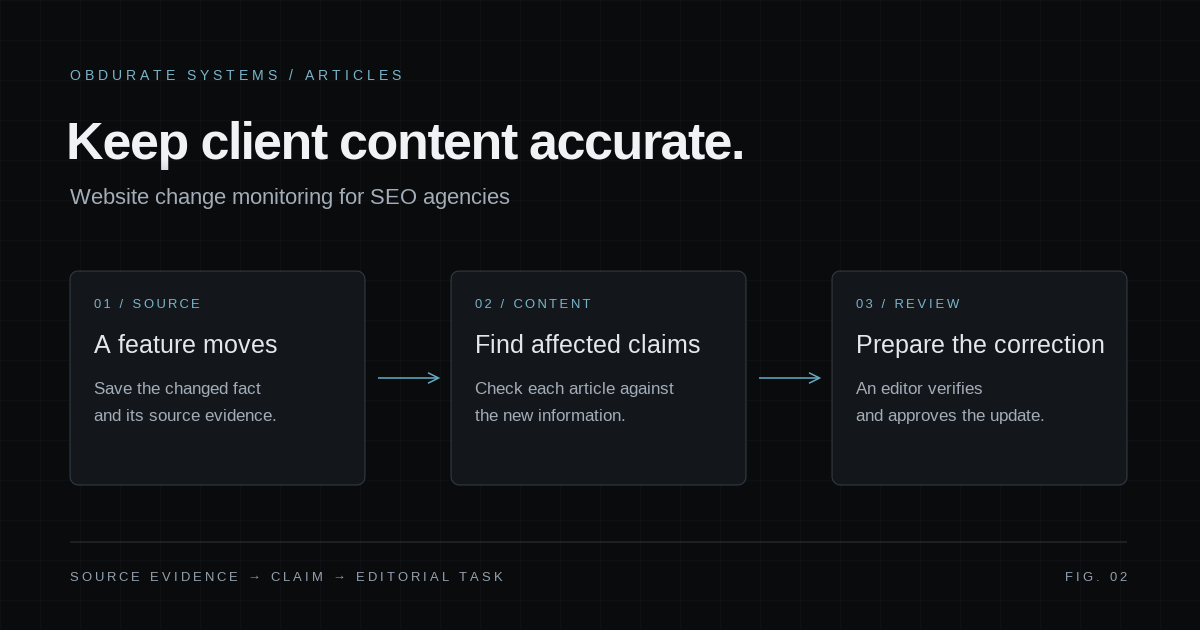
Website change monitoring checks a page over time and records what changes. For an SEO agency maintaining SaaS comparison pages, its most useful output is a correction an editor can verify, assigned to the right client article.
Use the free review worksheet to record the source evidence, affected claim and editorial decision.
A software vendor moves a feature to a different plan. Your client’s comparison page still recommends the old plan. The article has become inaccurate without anyone touching it, and the writer may have no reason to revisit the source until the next scheduled content refresh.
Obdurate Systems builds custom operational software and AI integrations around existing tools. We have delivered website change monitoring workflows as private client work. This guide explains the approach: connect source changes to affected content, use AI to help interpret the evidence, and keep editors in control of publication.
Start with the facts your published content relies on. For SaaS comparisons, that usually means official pricing pages, plan feature tables, product documentation, integration directories and release notes. Keep a record of which article uses each source and what it claims about the product.
Competitor price monitoring is one part of this work. A price needs context: currency, monthly or annual billing, per-seat or per-workspace charges, minimum commitments and included limits. A change from a monthly price to an annual equivalent can look like a discount if those fields are lost during extraction.
Competitor website monitoring can also cover new features, removed integrations and changed product positioning. Choose the pages that support a client deliverable. A large watchlist is only useful if someone knows what to do with its findings.
Existing products already handle much of the collection work. For example, PageCrawl offers page monitoring and AI change summaries. The agency still needs to decide which changes affect its content, who owns the edit and whether the proposed correction is supported by the evidence.
ExampleDesk is a fictional SaaS product used to explain the workflow. The product, plans and change below are illustrative. Our client work is private, so we are not naming a client or reproducing their content here.
In the first saved pricing snapshot, ExampleDesk lists its Salesforce integration under both Growth and Business. In a later snapshot, the page says new subscriptions require Business to use Salesforce. The page does not explain what happens to existing Growth customers.
Three articles in the agency’s content inventory mention this integration. They should receive different treatment:
| Published claim | Editorial decision |
|---|---|
| “Growth includes Salesforce integration.” | Prepare a correction: new subscriptions need Business for Salesforce. |
| “ExampleDesk integrates with Salesforce.” | Leave this claim unchanged. The integration still exists. |
| “Growth is the cheapest suitable plan for teams using Salesforce.” | Reassess the recommendation and verify the current Business price before proposing replacement copy. |
None of these observations supports saying that every existing Growth customer has lost access. That question remains unresolved. A useful system preserves the qualification about new subscriptions and sends uncertainty to an editor.
The essential record is a link between a source fact and an article claim. For each monitored fact, store the product, plan or feature, source URL, relevant excerpt and capture time. Alongside it, store the client article URL, the exact sentence or table cell, and its editorial owner.
This can begin as a small reviewed spreadsheet. An AI-assisted pass could suggest relationships across a larger content library, but those matches need checking: two articles can mention the same product without making the same claim. Keep the matching passage visible so a reviewer can judge the relationship.
- 01Capture a consistent baselineSave the relevant source content and context. Use the same locale, billing selection and page section on subsequent checks so the comparisons remain meaningful.
- 02Confirm a material changeSeparate a product fact from navigation, banners and layout changes. Verify ambiguous observations against another capture or an official supporting source before proposing an edit.
- 03Review the affected claimsMatch the changed fact to the agency’s article inventory. Classify each claim as needing a correction, remaining supported or requiring further research.
- 04Prepare and assign the editorial taskAttach the before-and-after evidence, the affected passage and proposed wording. Route the task into the team’s existing editorial system with a named owner.
- 05Approve, publish and verifyAn editor checks the evidence and surrounding recommendation before publishing. Confirm the approved correction appears on the live article and update the claim record for the next check.
If the same source change affects several articles, group those tasks under one change record. If an article changes while a task is waiting, compare it with the saved passage again before applying the correction. This avoids duplicate assignments and edits based on an obsolete draft.
Use one record per affected claim. Copy this template into your editorial tool and keep the evidence with the review. The download includes the blank template and a filled ExampleDesk example. No signup is needed.
Download the review worksheet (.md)
Blank review template
Source URL:
Capture context (locale, plan, billing basis):
Previous capture (time, excerpt, saved evidence):
Current capture (time, excerpt, saved evidence):
Observation: confirmed change / unable to verify
Affected article URL and exact claim:
Decision: correction / still supported / research required
Proposed wording and reason:
Unresolved questions:
Priority and reason:
Editor and review status:
Published revision URL and verification time:
If a source could not be checked, keep that observation separate from a confirmed change. Leave publication details empty until an editor approves the wording and verifies it on the live article.
An editor should be able to assess the proposed update without reconstructing the research. Here is an illustrative task for the first ExampleDesk claim:
- Affected content
- The Salesforce row in the client’s ExampleDesk comparison page. Current claim: “Included in Growth.”
- Source evidence
- The official pricing URL, dated previous and current snapshots, and the excerpts showing the change from Growth and Business to Business only for new subscriptions.
- Proposed correction
- “New subscriptions require Business for Salesforce integration.” Review any adjacent plan recommendation or cost comparison.
- Unresolved question
- The source does not establish whether existing Growth customers retain access. Do not extend the correction to those customers without confirmation.
- Owner and status
- Assigned client editor. Awaiting review. Publication requires approval.
Include a suggested priority with a reason. A change that reverses a buying recommendation deserves attention before a minor wording adjustment. The number of changed characters is a poor substitute for that judgment.
AI can extract a feature from a messy pricing table, recognise that two differently worded passages describe the same capability, or draft a correction. Explicit fields and ordinary checks should retain plan identity, currency, billing period and capture time. Every suggested factual change should point back to its source excerpt.
A failed request, empty page or blocked fetch should produce an “unable to verify” status. It is not evidence that a product feature disappeared. Similarly, a changed layout may require adjusting the extraction, while contradictory pricing and documentation should create a research task.
Use supported APIs or permitted page access where available, set a sensible check frequency and handle source failures explicitly. Keep the last successful observation and its age visible so nobody mistakes stale data for a current check.
Our AI integration approach follows the same principle: give the model a defined task, validate the output and keep review around consequential actions.
Start by evaluating an existing monitoring product. If your team can act on its alerts directly, that may solve the problem. Products such as ChangeTower already offer change analysis, snapshots and integrations. Those capabilities should be part of the comparison before commissioning software.
Custom work becomes more plausible when finding the affected articles and coordinating their updates takes substantial effort. The useful integration could join a monitoring provider to your client content inventory, editorial rules, project management system and CMS. The agency can own those relationships and decisions while buying the collection capability.
Count the recurring costs as well as the build: monitoring or scraping, model usage, storage, human review and maintenance when source pages change. A small collection of rarely updated articles may be cheaper to maintain manually. Our build-versus-buy guide covers the wider decision about ownership and ongoing support.
Begin with 10–20 source pages, 5–10 comparison articles and one editorial destination. Have an editor confirm the baseline claims. Test known historical changes or deliberately seeded examples as well as live observations; label simulated changes clearly. A quiet week with no alerts does not establish that the system detects changes correctly.
Track accepted corrections, false alerts, missed material changes in a manually reviewed sample, and time spent reviewing each task. Compare the total effort with the existing process, including setup and maintenance. Success means the agency can maintain useful coverage with less work or catch important inaccuracies it previously missed.
Keep that outcome separate from search performance. Content decay describes a decline in traffic or rankings, which can have several causes. Ahrefs’ content decay guide explains the distinction. An accurate comparison page can still lose traffic; fixing a plan detail does not establish a ranking or AI citation improvement.
To assess this for your agency, bring one comparison article, the sources it relies on and your current review process. Obdurate Systems can help scope which checks to automate, how the findings should enter your existing tools and what still needs an editor.